Themes for the UI attract the user very much. You will find may of the UI libraries being made skinnable. One such example is the new YUI 2.3.0 where Yahoo have added skinning capability to YUI library. I am going to talk about themes in Flex here. This blog entry is basicaly a reply to one of the comment I reveiced after writing about styles in Flex applications.
Themes in Flex can be in many forms. Flex themes are in three forms: simple CSS file, SWF or SWC file.Lets take each of these one after the other.
CSS file Themes:
This is one of the easy way arround to apply themes. If you have the CSS file you can set the style or skin using the <mx:Style> tag. I have written about the CSS styles and you can have a look here!
SWC file Themes:
Themes also take the form of SWC files. These file contain style sheets and the images as assets. This is the major benifit of SWC files over CSS. In case of CSS files you need to carry the assets seperatly. SWC file make it easier to distribute and is precompiled.
To apply the theme to your Flex application you need to user the theme compiler option. When you compile a application using the mxmlc you can use the theme option to specify the theme that you require to apply on the application. For example
mxmlc -theme C:/flex_sdk/themeTest/sample.swc -file-specs themedFlex.mxml
Another way to provide the theme during compilation is to make use of the <theme> tag in flex-config.xml file.
For more information on this check the online flex reference!
SWF file Themes:
You can use SWF files to hold sikn assets and refer them from the Flex application. A SWF file can hold one of more assets and you can embed the required element using the Embed statement as follows:
<mx:Style>
Button {
upSkin: Embed(source="../assets/SubmitButtonUpSkin.swf");
}
</mx:Style>
To embed a perticular symbol from the SWF file you can use the symbol property to specify the symbol. An example is shown below:
<mx:Style>
Button {
upSkin: Embed(source='../assets/SubmitButtonSkins.swf', symbol='MyUpSkin');
}
</mx:Style>
So regarding themes.. that's all for now.. Ah hold on.. you can download some Flex themes from here. Have a look, They are great!
Showing posts with label Flex. Show all posts
Showing posts with label Flex. Show all posts
August 03, 2007
June 12, 2007
Adobe rolls out Betas
Adobe Systems announced the public beta of Adobe Flex 3, Adobe Integrated Runtime (AIR) formerly code-named Apollo, Adobe Builder Beta and Flash Player update. With the new Flex and AIR Abode is pushing itself up in the rich Internet applications (RIAs) competition.
Adobe Flex 3 Beta:
The new version of cross platform, free open source framework for creating RIA adds rich new UI capabilities, enhanced developer productivity, desktop deployment and enterprise t esting and performance tools. The Flex 3 public beta also marks the first significant deliverable for the open source Flex project, beginning with the availability of nightly builds and a public bug database. Some of the key changes in Flex 3 from its predecessors are:
- Enhancement to designer/developer workflow.
- New Containers (mx:ConstraintRow and mx:ConstraintColumn).
- Code enhancement include: faster compilation, compiler class caching, deeper language intelligence for AS3/MXML/CSS, Code Search, Refactoring, Code Outline, Profiling, Profiling Live Memory Data, Enhanced Module support, and Multiple SDK support.
- New Widgets, Components and Classes.
- Smaller SWF file.
Ted Patrick had a week long blog entries on the new Flex version. Each of the above mentioned features is explained in detail.
Adobe Integrated Runtime (AIR):
Apollo Runtime becomes Adobe Integrated Runtime. The cross-operating system r untime was code-named Apollo. It allows developers to use their existing web development skills to build and deploy rich Internet applications to the desktop. Now AIR is set to become a major runtime that all the desktops will have. AIR will also pay a major roll in RIA, mashup softwares and Web 2.0 and beyond.
Flex Builder 3 Public Beta is available for download in Adobe Labs. This early public prerelease version begins a new, more transparent product development process from Adobe, with frequent, regular access to early builds and greater insight provided into the feature roadmap and planning process. The Flex Builder 3 beta release will provide you with an opportunity to explore powerful new features. Some of the new major features include:
- Support for the new Adobe Integrated Runtime (AIR).
- Code Refactoring.
- Memory and performance profiling.
- SWF file size reduction through persistent framework caching.
You can also view the complete detailed specs for Flex Builder 3.
Flash Player 9 Update 3 Beta 1:
The new Flash player is code-named "FrogStar". It adds support for caching the Flex Framework within the Flash Player. Moving forward the Flex Framework will be cached within the Flash Player dramatically reducing the size of the output SWF files. SWF files will contain only your code and Flex Preloader containing the caching/loading logic. Some of the new capabilities of Flash Player are:
- Flex Framework to be cached for use across domains.
- The Player Cache will support Flex 3.0 and future versions of the Flex Framework.
- Flex Framework now supports Runtime Shared Libraries (RSL's).
Conclusion:
So with these new features, Adobe is trying to capture the market which other

June 08, 2007
Styles in Flex
Labels:
Flex
Flex provides many ways to apply styles to UI components and make the UI appealing. It has been designed to provide a very attractive UI and interaction which other technologies lack to provide. Lets looks at some the facilities Flex provide to modify the appearance of Flex components.
Flex components have properties can define the size of a font or text colour or the background colour of a container. In Flex, some styles are inherited from parent containers to their children, and across style types and classes. This means that you can define a style once, and then have that style apply to all controls of a single type or to a set of controls. Like CSS in HTML, you can override individual properties for each control at a local, component, or global level, giving you great flexibility in controlling the appearance of your applications. At the same time, Flex does not support controlling all aspects of component layout with CSS. Properties such as x, y, width, and height are properties, not styles, of the UIComponent class and, therefore, cannot be set in CSS. Other properties, such as left, right, top, and bottom are style properties and are used to manipulate a component’s location in a container.
We will go through three different methods of applying the styles. They are: External style sheets, Local style definitions and Inline style definitions.
Flex components have properties can define the size of a font or text colour or the background colour of a container. In Flex, some styles are inherited from parent containers to their children, and across style types and classes. This means that you can define a style once, and then have that style apply to all controls of a single type or to a set of controls. Like CSS in HTML, you can override individual properties for each control at a local, component, or global level, giving you great flexibility in controlling the appearance of your applications. At the same time, Flex does not support controlling all aspects of component layout with CSS. Properties such as x, y, width, and height are properties, not styles, of the UIComponent class and, therefore, cannot be set in CSS. Other properties, such as left, right, top, and bottom are style properties and are used to manipulate a component’s location in a container.
We will go through three different methods of applying the styles. They are: External style sheets, Local style definitions and Inline style definitions.
External Style Sheets:
You can use the CSS files apply styles to a document or across entire applications. You can point to a style sheet with simple
<mx:script source=”test.css”>
You can include the CSS files that come with the SDK to get a better look and feel. Also you can create style using photoshop.
Local Style Definitions:
You can set the style for a MXML file or application using the
<?xml version="1.0"?>
<mx:application mx="http://www.adobe.com/2006/mxml">
<mx:style>
.redFont {
fontSize: 15;
color: #FF0000;
}
</mx:Style>
<mx:button stylename="redFont" label="Red Font">
<mx:button label="No Style Applied">
</mx:Application>
Inline Style Definitions:
Another alternative method is to apply style to a component inline. These properties apply only to the instance of the control. This is the most efficient method of applying instance properties because no ActionScript code blocks or method calls are required. In this case we apply styles in the component tag itself. For example if we want to apply font size 15 to the button we write:
<mx:button fontsize="15" label="A button"/>
Similarly, we can apply other styles like color, theme color etc.
For now we have talked about the ways to apply styles using the
May 02, 2007
Adobe to open up Flex
I am bit late for this entry but here it is: Abode has announced its plan to open source Flex and its development. This press release appeared on Abobe's site on April 26th (and I was busy preparing for my final review).
According to Adobe, they are to release ActionScript components from the Flex SDK,Java code for ActionScript and the MXML compiler. The open sourced Flex SDK will be available under Mozilla Public License (MPL).The MPL will allow full and free access to the source code, allowing developers to download, extend, and contribute to the source code for the Flex compiler and framework classes. This show Adobe's commitment to open technology initiatives, including the contribution of source code for the ActionScript Virtual Machine to the Mozilla Foundation under the Tamarin project. At the same time it also show how Adobe is planning to tackle its rivals like Dekoh, Dojo etc which are already open.
Now Microsoft's Silverlight is yet to see the open source light. And I am sure that's not going to happen. Another set back that Silverlight will have is that, the support for linux (Unless mono project take up the task). So... keeping the heat on RIA technology all these products are going to change our internet experience in next 2 year in a big way!
According to Adobe, they are to release ActionScript components from the Flex SDK,Java code for ActionScript and the MXML compiler. The open sourced Flex SDK will be available under Mozilla Public License (MPL).The MPL will allow full and free access to the source code, allowing developers to download, extend, and contribute to the source code for the Flex compiler and framework classes. This show Adobe's commitment to open technology initiatives, including the contribution of source code for the ActionScript Virtual Machine to the Mozilla Foundation under the Tamarin project. At the same time it also show how Adobe is planning to tackle its rivals like Dekoh, Dojo etc which are already open.
Now Microsoft's Silverlight is yet to see the open source light. And I am sure that's not going to happen. Another set back that Silverlight will have is that, the support for linux (Unless mono project take up the task). So... keeping the heat on RIA technology all these products are going to change our internet experience in next 2 year in a big way!
April 03, 2007
Flex Atom reader
Labels:
Flex
Here my first useful Flex application! For the past few week I have been building Flex applications that was not useful in any sense except that I got to learn hot to make use of different components, ActionScript etc. You can view the AtomReader from here and also download the source code.
AtomReader is a very simple feed reader that read the feed of Flex Team and display it. For now, the AtomReader just displays the summary and doesn't link to the appropriate blog entry. The next version of AtomReader will have following facilities:
Running Example : http://flexguide.googlepages.com/atomreader
Source Code : http://flexguide.googlepages.com/Atom.mxml

AtomReader is a very simple feed reader that read the feed of Flex Team and display it. For now, the AtomReader just displays the summary and doesn't link to the appropriate blog entry. The next version of AtomReader will have following facilities:
- User can enter any atom feed and view the result.
- User can also click on the title a view the complete entry.
- A better user interface than the first version.
Running Example : http://flexguide.googlepages.com/atomreader
Source Code : http://flexguide.googlepages.com/Atom.mxml
March 29, 2007
What is Adobe targeting?
Adobe released alpha version of Apollo (a cross-OS runtime) on 19th March. Since I was keeping close watch on Adobe site, I downloaded Apollo and started playing with it. Both Flex and Apollo have brought great excitement to be because of their UI, easy to work with and FDS (Flex Data Service). So with these new products what was Adobe's long term goals? Are they looking at capturing web from java and ajax?
What I thought was, yes Adobe will steal a big share from ajax in near future. But I got a new vision of what Adobe was targeting today when I was looking for example applications in the Adobe labs. "Adobe LiveCycle Data Services 2.5" is what caught my attention! LiveCycle Data Services 2.5 is the next generation of Flex Data Services. On reading the first paragraph, I first action was to learn more about LiveCycle a server-based software for enterprise automation. So now you can guess what's on Adobe's mind and why they are changing FDS to LCDS!
The main idea is to integrate the Adobe products like LiveCycle, ColdFusion, Breeze and obviously Flex/Apollo to build a enterpise solution set that will help in business process management(BPM) to content management and finally compete with existing technologies like Documentum (java based), SharePoint (Microsoft .Net based), Lotus (from IBM). The major advantage of Flex and Apollo is its interface design and their cross-OS runtime. The sucess of Flex and Apollo is very important for Adobe to compete in the market and take a big bite! But its going to be a tough war because Apollo is going to have security issues due to the FileSystem APIs and how well the developer community is going to accept it. Another mater of concern is Adobe is a money making company. Every product is price tagged and that will effect the view of any developer which Adobe is eying. S0 will Adobe succeed in the new leap? I am sure that they have pumped in lot of money for Apollo. Will it be a sucess and turn other pressure other runtimes like java and .net? Time will tell about this but I am already into studying the new technology!
What I thought was, yes Adobe will steal a big share from ajax in near future. But I got a new vision of what Adobe was targeting today when I was looking for example applications in the Adobe labs. "Adobe LiveCycle Data Services 2.5" is what caught my attention! LiveCycle Data Services 2.5 is the next generation of Flex Data Services. On reading the first paragraph, I first action was to learn more about LiveCycle a server-based software for enterprise automation. So now you can guess what's on Adobe's mind and why they are changing FDS to LCDS!
The main idea is to integrate the Adobe products like LiveCycle, ColdFusion, Breeze and obviously Flex/Apollo to build a enterpise solution set that will help in business process management(BPM) to content management and finally compete with existing technologies like Documentum (java based), SharePoint (Microsoft .Net based), Lotus (from IBM). The major advantage of Flex and Apollo is its interface design and their cross-OS runtime. The sucess of Flex and Apollo is very important for Adobe to compete in the market and take a big bite! But its going to be a tough war because Apollo is going to have security issues due to the FileSystem APIs and how well the developer community is going to accept it. Another mater of concern is Adobe is a money making company. Every product is price tagged and that will effect the view of any developer which Adobe is eying. S0 will Adobe succeed in the new leap? I am sure that they have pumped in lot of money for Apollo. Will it be a sucess and turn other pressure other runtimes like java and .net? Time will tell about this but I am already into studying the new technology!
March 26, 2007
Flex + Documentum
Labels:
Documentum
,
Flex
I started learning Adobe Flex recently and how I got inspired about RIA is through my brother Reji. I did fiddle and play around with Flex SDK and I really like it. With release of Apollo alpha, I am sure there is more adventure coming up my way :) .
This weekend I tried out two things with the flex:
This weekend I tried out two things with the flex:
- Maintaining HTTP Session in flex
- Connecting Flex with a Documentum repository
Both of these objective turned out to be quite simple but I will explain the second project that I did. For those how don't know Documentum: Its a ECM (Enterprise Content Management) Tool from EMC. My aim was to create a simple login screen, validate the user and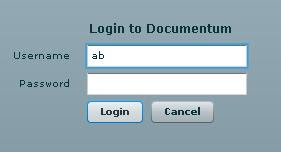 login to a DocBase.
I made use of the HTTPService provided by the FDS (Flex Data Service) to rend the user's login information. At the server side I had a java servlet that received the login information as request parameter and then authenticated the user. If the user was a valid user, I just returned a string embedded in a XML and finally displayed it using the alert box in flex.
The code Flex code and the servlet is available for download and one important note for developers using Documentum is that: "You should consider using Flex for building web applications on top of Documentum". I will put up a DQL executer next week.
 login to a DocBase.
I made use of the HTTPService provided by the FDS (Flex Data Service) to rend the user's login information. At the server side I had a java servlet that received the login information as request parameter and then authenticated the user. If the user was a valid user, I just returned a string embedded in a XML and finally displayed it using the alert box in flex.
The code Flex code and the servlet is available for download and one important note for developers using Documentum is that: "You should consider using Flex for building web applications on top of Documentum". I will put up a DQL executer next week.
Subscribe to:
Posts
(
Atom
)